
The short answer
Hotel owners can automate daily revenue posting by pulling each property's closed business day from Oracle OPERA, through the Oracle Hospitality Integration Platform (OHIP) for OPERA Cloud or through exports for on-premises OPERA, and mapping it to the owner's chart of accounts. An integration layer then posts a balanced journal entry to the accounting system the owner uses, such as Yardi, MRI, or M3, and reconciles cash and card settlements against the bank. The result is daily, consistent revenue across every hotel, ready for investor reporting, without anyone re-keying a night audit report.
Key takeaways
• Hotel revenue lives in the PMS, but owners report from a real estate or investment ledger.
The gap is usually closed with spreadsheets.
• OHIP makes OPERA Cloud data available through APIs and business events,
including back-office operations and finance data, so that the daily posting can be automated.
• The OPERA Cloud migration is the right moment to fix it.
On-premises OPERA 5.6 has Oracle Premier Support until December 2027, and older interfaces must be rebuilt for the cloud anyway.
• Mapping is the hard part, not the connection.
Transaction codes have to map to USALI departments and to the owner's general ledger, entity by entity.
• KriyaSync,
KriyaGo's integration middleware, connects OPERA and OHIP to the systems real estate owners already run, such as Yardi, MRI, and M3.
Why hotel revenue is hard for real estate accounting
A hotel is an operating business inside a real estate asset. That creates a specific problem for owners whose finance teams are built around leases and rent rolls.
Revenue is generated every night, not every month.
An office or apartment building bills rent on a schedule. A hotel creates revenue every night from rooms, food and beverage, parking, resort fees, and dozens of other charges. Each property runs a night audit that closes the business day in the PMS. For an owner with ten hotels, that's more than 3,600 business days a year that need to reach the books.
The source system is a hotel system.
Many hotels, particularly full-service and branded properties, run Oracle OPERA as their property management system. OPERA is built for front-desk, reservation, and folio operations. It isn't built for fund accounting, entity consolidation, or investor waterfalls. Owners, REITs, and investment managers report from a different ledger: often Yardi Voyager or MRI on the real estate side, or a hotel accounting platform such as M3 when a management company keeps the books.
The data passes through many hands.
In a typical setup, the hotel's night auditor runs the reports. A management company accountant keys a daily revenue journal into its own system. Then, monthly, the owner's team receives a financial package and re-keys or uploads it into its own ledger. Every hand-off adds delay and a chance of error, and the owner sees results weeks after the stay.
Cloud migration is changing the plumbing.
Oracle's integration platform, OHIP, gives OPERA Cloud a self-service way to use APIs and subscribe to business events. Its API catalog covers reservations, hotel operations, configuration, and data. It includes a Back Office Operations API for reconciling guest folios and processing credit card transactions, and data APIs that cover finance subject areas.
For hotels still on premises, the clock is running. According to Chatlyn's summary of Oracle's support policy, OPERA 5.6, the last on-premises release, has Premier Support until December 2027, after which it moves to Sustaining Support. The software keeps running, but new fixes and certifications stop. Moving to OPERA Cloud also means rebuilding older interfaces, such as OXI, on OHIP. Any revenue export built on the old system has to be redone anyway, so the migration is the natural time to automate it properly.
What daily revenue posting actually involves
Automating the daily revenue journal sounds like a single export. In practice, it's a chain of five steps, and each one has its own failure point.
Step 1: Close the business day
The night audit rolls OPERA to the next business date, posts room and tax charges, and freezes the day's figures. Automation should run only after the audit has finished. Pulling data mid-audit is one of the most common causes of mismatched totals.
Step 2: Extract the day's financials
The owner needs revenue by transaction code, taxes, payments by method, advance deposits, city ledger (accounts receivable) movement, and guest ledger balances. On OPERA Cloud, that data is available through OHIP APIs and business events. On-premises, it usually comes from scheduled reports or file exports.
Step 3: Map to the owner's chart of accounts
OPERA transaction codes describe hotel activity: room revenue by segment, banquet food, minibar, parking, resort fee. The owner's ledger is organized differently, usually by entity, property, and USALI department (the Uniform System of Accounts for the Lodging Industry). A mapping table translates each transaction code to a general ledger account, department, and entity. That table is where most of the real work, and most of the errors, sit.
Step 4: Post a balanced journal entry
The mapped day becomes a balanced journal entry: revenue and tax liabilities on one side, cash, card clearing, guest ledger, and city ledger on the other. It posts to the right entity and period in Yardi, MRI, or M3, with a reference back to the OPERA business date.
Step 5: Reconcile cash and cards
Card processors settle days later and net of fees. Cash deposits are batched. The posted card clearing and cash accounts must match what actually reaches the bank, or differences pile up until month-end.
The five common failure points
Failure point | What goes wrong | How automation prevents it |
Timing | Data pulled before the night audit finishes | Trigger on the business-date-closed event, not a clock time |
Unmapped codes | A new transaction code is added at the hotel and posts nowhere | Block the posting and alert finance when an unmapped code appears |
Out of balance | Rounding, voids, or adjustments leave debits ≠ credits | Validate the balance before posting; post nothing that doesn't balance |
Duplicates | A day is posted twice after a retry or a re-run | Use the property and business date as a unique key |
Settlement gaps | Card and cash postings never get matched to the bank | Reconcile clearing accounts daily against bank and processor data |
How the integration works
An automated flow has three parts: the hotel source, an integration layer that maps and validates, and the owner's ledger.
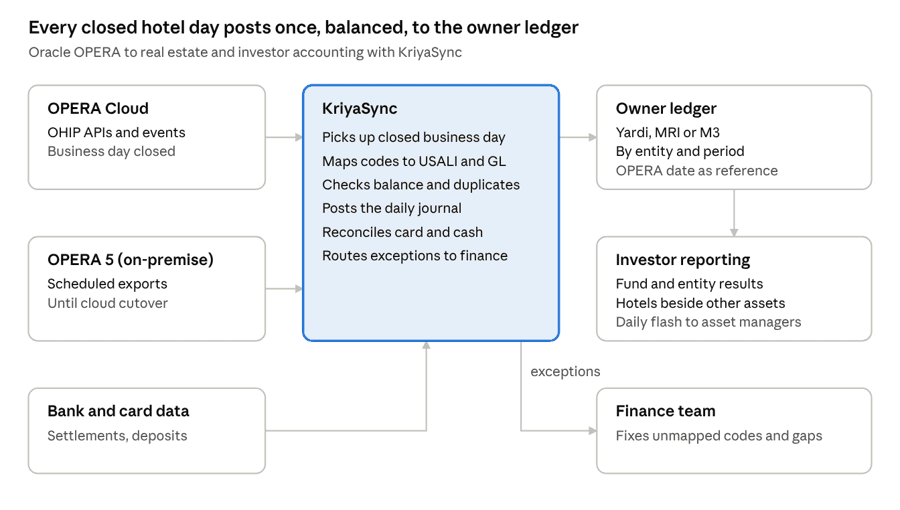
Oracle OPERA to owner ledger · daily revenue posting with KriyaSync
OPERA Cloud hotels send their closed day through OHIP, and on-premises hotels through scheduled exports. KriyaSync maps, checks, and posts each day to the owner's ledger, reconciles card and cash against the bank, and sends anything it can't resolve to the finance team.
KriyaGo's approach: KriyaSync as the hospitality bridge
KriyaSync is KriyaGo's universal integration middleware for real estate. It already connects the systems property owners rely on, including Yardi, MRI, Procore, Sage, SAP Concur, and bank feeds. KriyaGo has delivered more than 100 integrations, including the full set of ERP integrations for Jones across roughly 2.5 billion square feet. For hotel owners, KriyaSync extends that same platform to the hospitality stack: Oracle OPERA and OHIP on the hotel side, and M3 where a management company keeps the hotel books.
What KriyaSync does in the daily posting
• Event-driven extraction.
On OPERA Cloud, KriyaSync uses OHIP APIs and business events to pick up each property's closed business day. For on-premises OPERA, it takes scheduled exports until the property moves to the cloud, so the owner-side process doesn't change at cutover.
• A managed mapping layer.
Transaction codes map to USALI departments, general ledger accounts, and entities in one maintained table per property or brand standard. New or unmapped codes stop the posting and alert finance, instead of disappearing.
• Validation before posting.
Every day is checked for balance, duplicates, and completeness before anything reaches the ledger.
• Posting to the owner's ledger.
Balanced daily journals post to Yardi, MRI, or M3, by entity and period, with the OPERA business date as the reference.
• Exceptions to people, with context.
When something fails, finance gets a clear message: which hotel, which date, and why.
Built for real estate finance, not just hotel operations
The difference with KriyaGo is where the data ends up. Most hospitality connectors stop at a hotel general ledger. Owners and investment managers need the next step: hotel results consolidated with the rest of the real estate portfolio, by fund, entity, and investor. Because KriyaSync already connects to real estate and investment platforms, the hotel's daily revenue lands in the same ledger the owner uses for every other asset. KriyaSync runs on Microsoft Azure, with a visual workflow layer built on n8n so changes to the posting logic can be made and tested quickly.
Optional: cash and reporting
Some owners extend the flow further. Bank and card settlement data can be reconciled against the posted clearing accounts, and daily flash results can be sent automatically to asset managers and investors. These extensions use the same KriyaGo platform, so there's no second integration project.
Who this is for
Owner type | Typical setup | What automation changes |
Hotel-owning REITs | Several hotels, each run by a third-party operator, reporting into a REIT ledger. | Daily, comparable revenue across operators, instead of waiting for monthly packages |
Mixed-use owners | A hotel inside a portfolio of office, retail or residential assets on Yardi or MRI | The hotel lands in the same ledger and reports as every other asset. |
Hotel investment funds and asset managers | Hotels held in funds with multiple investors and entities | Faster investor reporting and fund-level consolidation |
Owner-operators with M3 | The hotel books kept in M3, with owner reporting in a real estate platform. | One automated flow from OPERA through M3 to the owner's ledger |
Implementation checklist
Use these steps to plan an OPERA-to-ledger integration, whether you're on OPERA Cloud already or planning the move from OPERA 5.
1. List every hotel and its stack.
Record each property's OPERA version (cloud or on-premises), operator, hotel accounting system, and the owner ledger it reports into.
2. Agree who owns the data.
Management agreements often decide who can access the PMS. Confirm in writing that the owner, or its integration partner, can receive daily financial data.
3. Set up OHIP access.
For OPERA Cloud properties, register the integration in OHIP and confirm which APIs and business events are licensed.
4. Build the mapping table first.
Export every active transaction code per property and map it to the USALI department, general ledger account, and entity. Agree on a brand or portfolio standard where you can.
5. Define the daily journal.
Decide the level of detail (summary or by department), the cut-off rules, and how taxes, deposits, and city ledger are handled.
6. Run in parallel for one month.
Post automatically to a test entity while the manual process continues. Compare daily and month-end totals.
7. Set exception rules.
Decide who gets alerted for unmapped codes, out-of-balance days, and missing business dates, and how quickly they must respond.
8. Add bank and card reconciliation.
Match clearing accounts to settlements daily so month-end doesn't start with a backlog.
9. Time it with the cloud migration.
For OPERA 5 hotels, build the owner-side flow once and switch the source from exports to OHIP at cutover.
10. Review mappings quarterly.
Hotels add outlets, packages, and fees. Keep the mapping table current.
Frequently asked questions
The bottom line
Hotel owners shouldn't need a spreadsheet to see last night's revenue. With OPERA Cloud and OHIP, the data is available every day through APIs. With a mapping layer built for real estate finance, it can land in the same Yardi, MRI, or M3 ledger the owner already uses. For owners still on OPERA 5, the move to the cloud is the best time to rebuild the flow properly, once.
To see how KriyaSync connects Oracle OPERA to your real estate and investor accounting, talk to KriyaGo. For a broader view of the hotel tech stack, read Hospitality Tech Stack: Connecting Opera, M3 & Finance.