

The short answer
To connect SAP Concur Expense to Yardi Voyager or MRI Platform X, real estate firms use an integration layer that automates expense data flow, ensures approved reports are split by property, entity, and GL account, and then posts them into the ERP. This layer also manages intercompany entries when a property pays for costs on behalf of another entity, maintains synchronization of property, entity, and account lists, and routes reimbursement and card payment data appropriately. KriyaGo's middleware, KriyaSync, facilitates this process through KriyaGo Expense Connect, a partner app listed on the SAP Concur App Center.
Key takeaways
• Generic Concur connectors stop at the GL account.
Emphasizing property, entity, and other details ensures your expense data aligns with your real estate needs so that you can post with confidence.
• The hard part is allocation.
One expense report can touch several properties and legal entities, even when the corporate office pays the card bill.
• Two-way sync prevents rejections.
When properties, entities, and GL accounts flow from Yardi or MRI into Concur, employees can code only to valid values,
helping you stay in control and reducing manual correction.
• Proven in production.
Westwood Financial runs Concur with MRI, and Encore runs Concur with Yardi. Both connections are built and operated on KriyaSync.
Why Concur expenses are hard to post in real estate
SAP Concur Expense is widely used to capture travel, mileage, meals, supplies, and corporate card spend. In most industries, the accounting side is simple: an approved report becomes a journal entry by cost center and GL account. Real estate is different, for four reasons.
1. Every expense belongs to a property
A property manager's mileage, a site visit, the hardware-store run for a vacant unit: each belongs to a specific property, and often a specific unit or job. Yardi and MRI organize the books by property and entity, so an expense coded only to a department can't be posted correctly.
2. The payer and the owner are often different entities
Corporate cards are usually issued and paid by the management company or head office. The cost, though, belongs to the property-owning entity. That means every card expense charged to a property needs an intercompany entry: a receivable in the paying entity and a payable in the property entity. Done by hand, this is one of the most error-prone tasks in property accounting.
3. Recoverability matters
In commercial real estate, some property expenses can be recovered from tenants through CAM (common area maintenance) or other recovery pools, and some costs are charged back to a specific tenant. If the expense isn't tagged correctly when it's posted, it can be missed at CAM reconciliation time, and that's revenue left on the table.
4. Lists change constantly
Properties are acquired and sold. Entities are created. GL accounts and jobs open and close. If Concur's lists aren't kept in step with Yardi or MRI, employees code to values that no longer exist, and expense lines are rejected at posting.
What the manual process looks like
Without an integration, the usual workflow is: export Concur's accounting extract to a spreadsheet, have someone in accounting re-code each line by property and entity, add the intercompany entries, then import or key the results into Yardi or MRI. For a firm with hundreds of employees and properties, that's days of work every month. It also delays reimbursements and card reconciliations.
How a Concur-to-Yardi or MRI integration works
A well-built integration runs in two directions. Master data flows from the ERP into Concur, and approved expenses flow from Concur into the ERP.
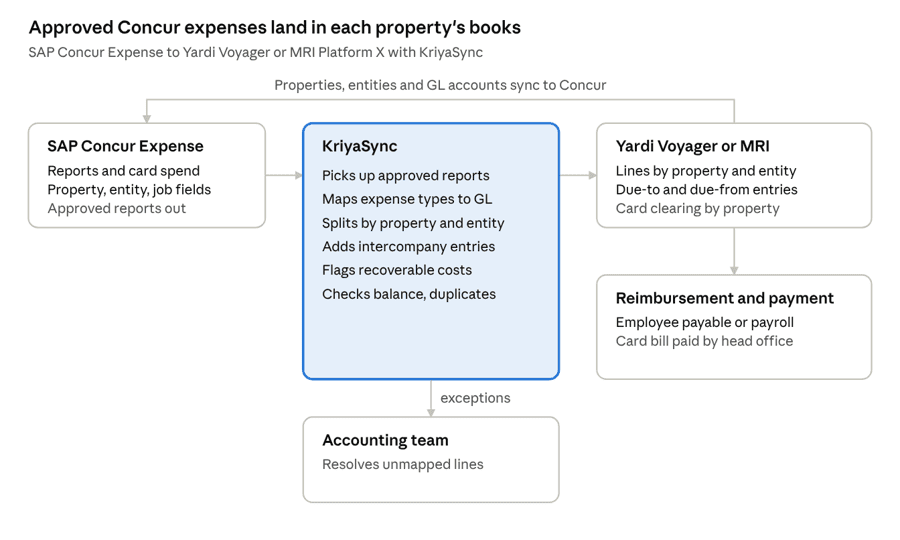
SAP Concur Expense to Yardi or MRI · KriyaSync flow
Yardi or MRI sends its properties, entities, and GL accounts to Concur, so employees code against valid values. When a report is approved, KriyaSync maps, splits, and checks it, then posts property-level lines and intercompany entries to the ERP. Reimbursements go to an employee payable or payroll, and anything that can't be mapped goes to the accounting team.
Mapping Concur fields to Yardi and MRI
Most of the design work in a Concur integration is agreeing on which Concur field carries each piece of real estate coding. Proper mapping and exception handling ensure smooth processing, giving you confidence in data accuracy and reducing errors.
Concur Expense data | Yardi Voyager | MRI Platform X | Notes |
Employee | Employee as payee (vendor record) | Employee as payee (vendor record) | Used for out-of-pocket reimbursements |
Expense type | GL account | GL account | Mapped per expense type, with overrides by property type if needed |
Custom field: property | Property | Building or entity | List synced from the ERP |
Custom field: legal entity | Entity or book | Entity | Drives intercompany entries when it differs from the payer |
Custom field: job or project | Job | Job | Optional, for capital or tenant-improvement work |
Custom field: recoverable | Recovery or CAM coding | Recovery coding | Flags the cost for tenant recovery |
Allocation percentages | One line per property | One line per entity | Splits one expense across several properties |
Payment type (card or cash) | Card clearing or employee payable | Card clearing or employee payable | Separates card spend from reimbursements |
Report ID and approval date | Reference and posting date | Reference and posting date | Traceability back to Concur |
Receipt image | Attachment link | Attachment link | Optional, for audit support |
Two rules make the mapping hold up over time. First, the lists flow one way, from the ERP into Concur, so the ERP stays the master. Second, any line that can't be mapped stops at a clear exception instead of posting to a suspense account.
KriyaSync for SAP Concur Expense
KriyaSync is KriyaGo's integration middleware for real estate. It has delivered more than 100 integrations across Yardi, MRI, Procore, Sage, and other systems, including the full set of ERP integrations for Jones across roughly 2.5 billion square feet. For SAP Concur, KriyaGo is a Concur Certified Partner, and its expense integration is listed on the SAP Concur App Center as KriyaGo Expense Connect.
What KriyaGo Expense Connect does
According to the App Center listing, KriyaGo Expense Connect supports Concur Expense Standard and Concur Expense Professional, and is available in North America, Europe, the Middle East, Africa, and Asia Pacific. Its real estate capabilities include:
• Property and entity distribution.
Expenses are distributed to multiple properties or legal entities, "even if the corporate office pays the expense."
• Intercompany entries.
Balanced due-to and due-from entries are created automatically when the payer and the property owner differ.
• Tenant expense chargebacks.
Costs that belong to a tenant are tagged so they can be billed back.
• Corporate card statement distribution.
Each card statement is split by property, so every property's share lands in its own books.
• Payroll reimbursements.
Reimbursements can be initiated through payroll, with the matching ERP accounting entries.
• Real-time data flow.
Lists and postings move between Concur and the ERP as they change, not in month-end batches.
The listing names Yardi Voyager and MRI Platform X among the supported ERPs, along with Procore, Microsoft Dynamics 365, Zoho One, ADP, and others.
How KriyaSync handles the flow
• Master data sync, ERP to Concur.
Properties, entities, GL accounts, and jobs are pushed from Yardi or MRI into Concur's lists, so coding is valid before a report is submitted.
• Approved reports: Concur to ERP.
Once a report is approved, KriyaSync picks it up, applies the mapping and allocation rules, and posts to Yardi or MRI.
• Validation first.
Every batch is checked for balance, unmapped values, and duplicates before posting.
• Exceptions with context.
Anything that fails goes to the accounting team with the report ID, line, and reason.
• Built on Microsoft Azure,
with a visual workflow layer built on n8n, so allocation and posting rules can be changed and tested quickly.
Implementation by Assetsoft
Implementation consulting is provided by Assetsoft, KriyaGo's sister company and a Yardi and MRI consulting firm. So the people configuring the integration also understand the property accounting on the other side of it.
Client examples
Westwood Financial: SAP Concur and MRI
Westwood Financial is one of the largest privately held retail real estate investment firms in the United States. Founded in 1970 and headquartered in Los Angeles, it owns and operates more than 125 shopping centers across 15 states.
Westwood runs its property accounting on MRI Software and its employee spend on SAP Concur. KriyaSync connects the two, so expenses coded in Concur post to the right shopping center and entity in MRI without re-keying. The same KriyaSync platform also links Westwood's wider payables workflow across MRI, Concur, and AvidXchange.
Encore: SAP Concur and Yardi
Encore, a real estate group based in Dallas, runs Yardi Voyager as its system of record and uses SAP Concur Expense for employee spend. KriyaSync connects Concur Expense to Yardi as part of a wider integration program that also links facilities, expense, and vendor systems into a single source of truth.
With expense data flowing into Yardi automatically, Encore reported about 75% faster processing compared with the manual workflow.
What both have in common
| Westwood Financial | Encore |
ERP | MRI Software | Yardi Voyager |
Concur product | SAP Concur Expense | SAP Concur Expense |
Integration layer | KriyaSync | KriyaSync |
Asset focus | Grocery-anchored and service-oriented shopping centers | Multi-property real estate |
Result | Concur expenses post directly to MRI by center and entity | About 75% faster processing |
Implementation by Assetsoft
Use these steps to plan a Concur Expense integration with Yardi or MRI.
1. Confirm your Concur edition.
Check whether you run Concur Expense Standard or Professional, and which custom fields and connected lists are available.
2. Decide the coding model.
Agree on which Concur fields carry property, entity, job, and recoverability, and whether allocations are allowed on every expense type.
3. Make the ERP the master.
Set up the list sync from Yardi or MRI into Concur for properties, entities, GL accounts, and jobs, and agree on how often it runs.
4. Map expense types to GL accounts.
Build one mapping table, with overrides by property type only where you need them.
5. Define the intercompany rules.
Document which entity pays each card program, which due-to and due-from accounts apply, and how reimbursements are paid.
6. Separate card spend from reimbursements.
Card transactions post to a card clearing account. Out-of-pocket expenses post to an employee payable or flow to payroll.
7. Set exception handling.
Decide who is notified about unmapped values, closed properties, or out-of-balance batches, and how quickly they respond.
8. Run a parallel month.
Post to a test database while the manual process continues, and compare totals by property and entity.
9. Train approvers on coding.
Most rejected lines come from wrong property or entity coding at submission, not from the integration.
10. Review quarterly.
Add new properties, retire sold ones, and refresh mappings as your portfolio changes.
Frequently asked questions
The bottom line
SAP Concur excels at capturing employee spend, and Yardi and MRI excel at property accounting. The gap between them is real estate coding: property, entity, intercompany, and recoverability. A purpose-built integration closes that gap, so approved expenses land in the right property's books, card statements reconcile by property, and employees are reimbursed faster.
To see how KriyaSync connects SAP Concur Expense to Yardi or MRI, book a demo with KriyaGo or visit our SAP Concur integration page.